

UEFITool Firmware Analysis Utility
UEFITool is a firmware analysis utility that helps users explore and understand UEFI firmware structures in a clear and organized way.
500K+
Downloads
10K+
GitHub Stars
100+
Contributors
3
Platforms
Understanding UEFITool
What is UEFITool ?
UEFITool is a robust, open-source utility designed to examine, extract, and work with UEFI firmware images in a structured, transparent way. It is widely used by firmware developers, security analysts, and experienced users who need a deeper understanding of BIOS and UEFI firmware architecture.
UEFI, or Unified Extensible Firmware Interface, is the modern standard that replaces traditional BIOS and acts as a vital link between computer hardware and the operating system. UEFITool provides clear insight into this important firmware layer, allowing users to explore its components and organization with accuracy and confidence.
- Cross-Platform Support
- Open Source & Free
- Active Development
- Community Driven
Key Features
Advanced Capabilities for UEFI Firmware Analysis?
Explore what makes UEFITool a trusted solution for examining UEFI firmware, widely used by developers, researchers, and technical professionals across the globe.
Advanced Firmware Parsing
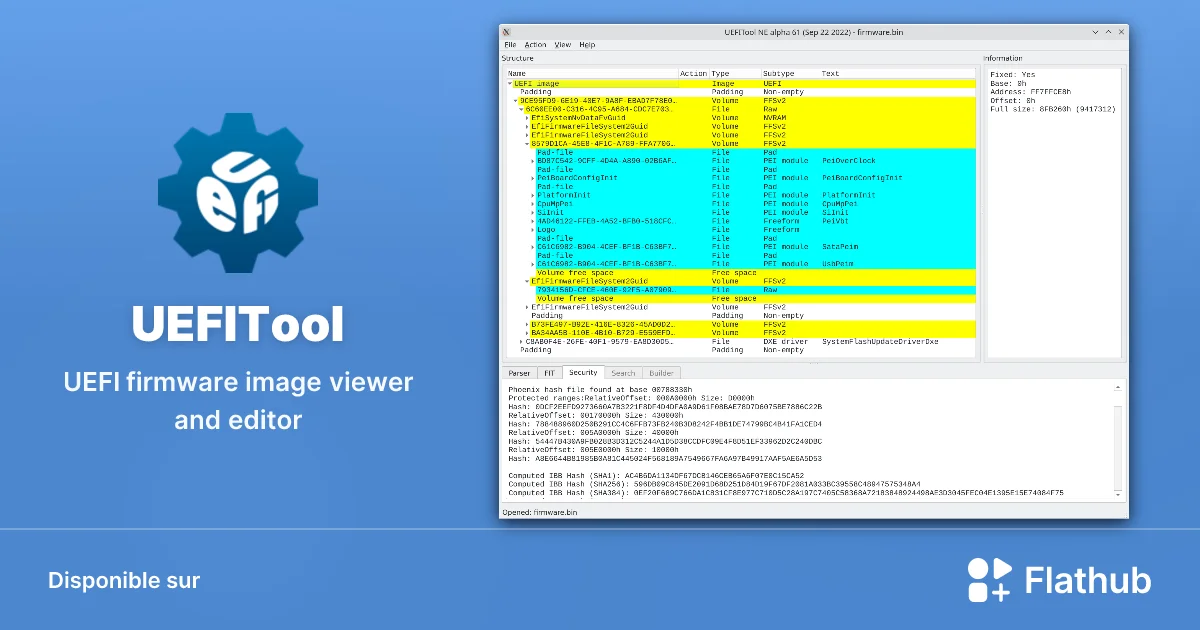
UEFITool offers powerful and precise firmware parsing designed to make UEFI analysis clear and manageable. It carefully examines complex firmware images, identifies individual firmware volumes, and presents detailed insights for every component. With its structured, hierarchical tree view, users can smoothly explore firmware sections, files, and modules, gaining a complete and transparent understanding of the overall firmware architecture.

Fast
Processing
100%
Accurate
Safe
Operations
Powerful Extraction Tools
UEFITool enables accurate extraction of components from UEFI firmware images without disrupting their original structure. Users can selectively retrieve individual drivers, applications, or configuration data, or extract complete firmware sections when needed. Each extracted element retains its original format, allowing for independent review, testing, or further analysis in a controlled and reliable manner.

Fast
Processing
100%
Accurate
Safe
Operations
Firmware Modification
UEFITool provides structured editing capabilities that allow users to make controlled changes to UEFI firmware images. You can replace existing modules, update firmware drivers, or add new components while maintaining the original layout. Built-in validation checks help identify potential issues during the process, supporting firmware integrity and reducing the risk of incomplete or unstable firmware builds.

Fast
Processing
100%
Accurate
Safe
Operations
Security Analysis
UEFITool supports in-depth security review of UEFI firmware images by enabling detailed inspection of firmware components and configurations. It helps researchers and professionals examine firmware integrity, review secure boot–related structures, and identify unexpected or unusual changes within firmware data. By highlighting known patterns and inconsistencies, the tool assists in responsible firmware verification and security-focused analysis.

Fast
Processing
100%
Accurate
Safe
Operations
Multi-Format Support
UEFITool is designed to work with a broad range of UEFI firmware formats used by different hardware manufacturers. It supports firmware images from vendors such as AMI, Phoenix, Insyde, and other commonly used formats. The tool automatically recognizes the firmware type and applies the correct parsing logic, ensuring accurate and consistent analysis across multiple platforms.

Fast
Processing
100%
Accurate
Safe
Operations
Firmware Rebuilding
UEFITool allows users to rebuild firmware images after controlled modifications while preserving the correct structure and internal consistency. During the rebuilding process, components are properly aligned and handled according to their original format. Built-in validation checks help identify potential issues early, supporting the creation of stable and well-formed firmware images suitable for further review or deployment.

Fast
Processing
100%
Accurate
Safe
Operations
Getting Started
How UEFITool Works
UEFITool operates as a firmware analysis utility that helps users understand the internal structure of UEFI firmware images without directly interacting with system hardware. Its design focuses on clarity, safety, and accurate interpretation of firmware data.
Reading UEFI Firmware Images
UEFITool begins by loading a UEFI firmware image file into its interface. Instead of treating the file as raw binary data, the tool interprets it according to UEFI specifications. This allows users to see how the firmware is organized rather than viewing unreadable code. Once loaded, the firmware image is displayed in a structured and logical format, making it easier to explore each component step by step.
Structured Tree Based Visualization
One of the core strengths of UEFITool is its tree-based layout. The firmware image is broken down into firmware volumes, files, and sections, all presented in a hierarchical view. This structure helps users quickly identify relationships between components and understand how different parts of the firmware are connected. The visual layout reduces complexity and improves readability, even for users who are new to firmware analysis.
Detailed Component Analysis
When a user selects a specific firmware component, UEFITool displays detailed metadata related to that item. This may include size, type, alignment, and other technical attributes defined by UEFI standards. By presenting this information clearly, the tool allows users to analyze firmware elements without guessing or relying on external references. This level of transparency is especially valuable for educational and research purposes.
Safe, Read-Only Operation
UEFITool is designed to operate in a non-invasive manner. It does not automatically modify firmware or write changes to system hardware. Instead, it focuses on safe, read-only analysis of firmware image files. This approach helps users explore and understand firmware content without putting their systems at risk, making the tool suitable for learning, inspection, and controlled research environments.
Offline and System-Independent Processing
All analysis performed by UEFITool takes place offline. The tool works with firmware image files stored on the user’s system and does not require an internet connection or live system access. Because it does not interact directly with installed firmware, UEFITool remains system-independent. This ensures that analysis can be performed without affecting system stability or performance.
Clear Error and Information Reporting
UEFITool provides informative messages when it encounters inconsistencies or unexpected structures within a firmware image. These messages help users identify potential issues or unusual configurations without confusion. By clearly reporting findings, the tool supports accurate interpretation rather than automated assumptions.
Designed for Learning and Technical Insight
At its core, UEFITool is built to help users gain a deeper understanding of UEFI firmware architecture. Its workflow encourages careful inspection, logical navigation, and responsible use. Whether used by students, IT professionals, or researchers, UEFITool supports informed analysis while maintaining a focus on safety and transparency.
Why This Process Matters
Understanding how UEFITool works allows users to approach firmware analysis with confidence. By combining structured visualization, detailed metadata, and safe operation, the tool turns complex firmware data into accessible information. This balance between technical depth and usability is what makes UEFITool a trusted choice for firmware exploration.
Compatibility
System Requirements
UEFITool runs on all major operating systems with minimal resource requirements.
Windows
Windows 7, 8, 10, 11
Native Windows application with full feature support.
macOS
macOS 10.13+
Universal binary supporting both Intel and Apple Silicon.
Linux
Any modern distribution
AppImage and source builds available for all distributions.
Minimum Hardware Requirements
Processor
64-bit x86 or ARM
RAM
4 GB minimum
Storage
100 MB free space
Practical Applications
Who Uses UEFITool and Why?
UEFITool is designed for individuals who need a clear and reliable way to explore UEFI firmware structures. It is commonly used for educational learning, technical analysis, and system-level research where understanding firmware layout and components is essential. The tool supports responsible use by allowing users to review firmware images without directly affecting live systems, making it suitable for both learning and professional evaluation purposes.
Common Use Cases of UEFITool
UEFITool is widely used to understand and examine UEFI firmware in a structured, responsible way. Its design supports educational, analytical, and diagnostic purposes without encouraging unsafe system modification. Below are the most common and legitimate use cases where UEFITool provides real value.
Firmware Structure Analysis
One of the primary use cases of UEFITool is analyzing the internal structure of UEFI firmware images. The tool presents firmware data in a clear, hierarchical layout, allowing users to understand how firmware volumes, files, and sections are organized. This is especially helpful for users who want to learn how modern firmware works or need to examine the logical structure of firmware files before further evaluation.
Educational Learning and Research
UEFITool is frequently used in academic and self-learning environments to study UEFI architecture. Students and researchers can explore firmware images to understand boot processes, firmware modules, and system initialization workflows. Because the tool focuses on visibility rather than automatic modification, it is well-suited for safe learning and technical research.
Firmware Image Inspection Before Updates
Before applying firmware updates, users may want to inspect firmware images to understand their contents. UEFITool allows users to review firmware data in advance, helping them gain insight into what the firmware contains at a structural level. This use case supports informed decision-making and encourages careful handling of system-level files.
Debugging and Diagnostic Review
In technical environments, UEFITool can assist with diagnostic analysis by allowing users to review firmware components when investigating system behavior or boot-related issues. By examining firmware structures, users can identify irregularities or missing elements without interacting directly with live system firmware.
Comparative Firmware Analysis
UEFITool is also useful for comparing different versions of firmware images. Users can analyze structural differences between firmware releases to understand changes over time. This is valuable for research, documentation, and educational comparisons, especially in controlled testing environments.
Understanding UEFI Modules and Metadata
Another common use case is reviewing metadata associated with UEFI modules. UEFITool displays detailed information about firmware sections, helping users understand how individual components are categorized and referenced within the firmware. This level of visibility supports deeper technical comprehension without requiring advanced programming knowledge.
Responsible Use in Controlled Environments
UEFITool is often used in offline or controlled environments where firmware files are examined without affecting active systems. This ensures safe handling of sensitive firmware data while maintaining system stability. The tool is intended for responsible usage aligned with manufacturer guidelines and best practices.
Why These Use Cases Matter
These use cases highlight how UEFITool supports learning, analysis, and transparency rather than risky system modification. By focusing on inspection and understanding, the tool aligns with professional standards and ethical technical practices. This approach makes UEFITool a trusted utility for users who value clarity, safety, and informed firmware analysis.
Who Should Use UEFITool?
UEFITool is designed for individuals who want to understand the internal structure of UEFI firmware responsibly and analytically. It serves a wide range of users, from learners to professionals, without requiring direct system modification.
Students and Learners Exploring Firmware Concepts
UEFITool is an excellent learning resource for students studying computer systems, firmware architecture, or boot processes. It allows learners to visually explore UEFI firmware components, helping them understand how modern systems initialize hardware and load operating systems. The structured interface makes complex firmware data easier to follow, supporting self-learning and academic research without introducing unnecessary technical risk.
IT Professionals and System Administrators
For IT professionals, UEFITool provides a practical way to review and analyze firmware images before deployment or updates. It can help system administrators better understand firmware layouts, verify image structure, and support documentation or troubleshooting workflows. Since the tool focuses on inspection rather than automated modification, it aligns well with professional best practices and controlled environments.
Firmware Researchers and Technical Analysts
Researchers and analysts working with system firmware can use UEFITool to study UEFI file systems, modules, and metadata in detail. The tool supports methodical examination of firmware images, making it useful for technical documentation, comparative analysis, and structured research. Its transparent design helps researchers focus on understanding firmware organization rather than managing unnecessary complexity.
Technology Enthusiasts and Advanced Users
Technology enthusiasts who are curious about how modern computers boot and manage firmware can use UEFITool as a safe exploration tool. It allows advanced users to gain deeper insight into firmware components while maintaining a clear separation between analysis and system changes. This makes UEFITool suitable for users who want knowledge without compromising system stability.
Educators and Technical Trainers
Educators and trainers can incorporate UEFITool into teaching materials and demonstrations related to firmware and system architecture. Its visual structure helps explain abstract concepts more practically and engagingly, supporting clear instruction in classroom or training environments.
Users Who Value Safe and Responsible Analysis
UEFITool is ideal for users who prioritize careful, informed, and ethical use of technical tools. It encourages responsible analysis by focusing on visibility and understanding rather than direct firmware alteration. This makes it appropriate for anyone seeking knowledge while respecting system integrity and manufacturer guidelines.
Download
Get UEFITool Now
Choose your platform and start analyzing UEFI firmware images today. UEFITool is completely free and open-source.
Installation Guide
Quick Installation
Get UEFITool up and running in minutes with our simple installation guides.
- windows
- Download the Windows installer (.exe) from the download section
- Run the installer and follow the on-screen instructions
- Choose your installation directory (default is recommended)
- Complete the installation and launch UEFITool from the Start menu
- macos
- Download the macOS package (.dmg) from the download section
- Open the DMG file and drag UEFITool to your Applications folder
- For first launch, right-click and select 'Open' to bypass Gatekeeper
- Grant any required permissions when prompted
- linux
- Download your preferred package format (AppImage, DEB, or RPM)
- For AppImage: chmod +x UEFITool-*.AppImage && ./UEFITool-*.AppImage
- For DEB: sudo dpkg -i uefitool_*.deb
- For RPM: sudo rpm -i uefitool-*.rpm
Installation Complete!
After installation, you can open any UEFI firmware image file (.rom, .bin, .cap, .fd) directly with UEFITool to begin your analysis.
Cross-Platform
Supported Platforms
UEFITool runs natively on all major operating systems with consistent functionality.
Windows
Supported Versions:
- Windows 7
- Windows 8/8.1
- Windows 10
- Windows 11
Architectures:
- x86 (32-bit)
- x64 (64-bit)
macOS
Supported Versions:
- macOS 10.12 Sierra+
- macOS 11 Big Sur
- macOS 12 Monterey
- macOS 13+ Ventura/Sonoma
Architectures:
- Intel x64
- Apple Silicon (M1/M2/M3)
Linux
Supported Versions:
- Ubuntu 18.04+
- Debian 10+
- Fedora 32+
- Arch Linux
Architectures:
- x86 (32-bit)
- x64 (64-bit)
Comparison
Why Choose UEFITool?
See how UEFITool compares to other firmware analysis tools on the market.
| Feature | UEFITool | Tool B | Tool C |
|---|---|---|---|
| Cross-Platform | ✓ | ✕ | – |
| Open Source | ✓ | ✕ | ✓ |
| Free to Use | ✓ | – | ✓ |
| GUI Interface | ✓ | ✓ | ✕ |
| Firmware Parsing | ✓ | ✓ | ✓ |
| Module Extraction | ✓ | ✓ | ✓ |
| Firmware Modification | ✓ | – | ✕ |
| Firmware Rebuilding | ✓ | ✕ | ✕ |
| Search Functionality | ✓ | ✓ | – |
| Regular Updates | ✓ | ✕ | – |
Testimonials
What Users Say
Join thousands of professionals who trust UEFITool for their firmware needs.
"UEFITool has become an indispensable part of my firmware security research. Its deep parsing capabilities help uncover vulnerabilities efficiently."
"Using UEFITool daily has simplified firmware debugging. Clean UI, accurate parsing, and excellent stability."
Got Questions?
Frequently Asked Questions
Find answers to common questions about UEFITool.
What is UEFITool used for?
UEFITool is used to analyze and explore UEFI firmware images. It helps users view firmware structure, components, and metadata in a readable and organized format.
Is UEFITool free to use?
Yes, UEFITool is available as a free utility and is commonly used for educational, research, and diagnostic purposes.
Does UEFITool modify system firmware automatically?
No, UEFITool does not automatically modify system firmware. Its primary purpose is inspection and analysis rather than direct system changes.
Who typically uses UEFITool?
UEFITool is commonly used by students, IT professionals, researchers, educators, and technology enthusiasts interested in understanding UEFI firmware structure.
Is UEFITool suitable for beginners?
Yes, beginners can use UEFITool to explore firmware data visually. However, understanding firmware concepts is recommended for effective use.
What types of firmware files does UEFITool support?
UEFITool supports common UEFI firmware image formats used in modern computer systems.
Can UEFITool be used for educational purposes?
Absolutely. UEFITool is widely used as a learning tool to study firmware architecture and boot processes.
Does UEFITool require programming knowledge?
No advanced programming knowledge is required to view firmware structures, although technical understanding can be helpful.
Is UEFITool an official manufacturer tool?
UEFITool is an independent utility and is not officially affiliated with hardware manufacturers.
Is using UEFITool legal?
Yes, using UEFITool for analysis, research, and educational purposes is legal when done responsibly and within applicable guidelines.
Is UEFITool safe to use?
UEFITool is safe when used for viewing and analyzing firmware images. Users should avoid making changes without proper knowledge.
Can UEFITool damage my computer?
Simply analyzing firmware files with UEFITool does not damage a system. Risks only arise if firmware is modified improperly using other tools.
Does UEFITool work offline?
Yes, UEFITool works offline and does not require an active internet connection.
Which operating systems support UEFITool?
UEFITool is available for multiple desktop operating systems, depending on the version and build.
Can UEFITool be used on laptops and desktops?
Yes, UEFITool can analyze firmware images from both laptops and desktop systems.
Does UEFITool provide extraction features?
UEFITool allows users to extract firmware components for analysis and study purposes.
Is UEFITool recommended for firmware updates?
UEFITool is not designed to perform firmware updates. It is intended for analysis and inspection only.
Should I back up firmware before using UEFITool?
Backing up firmware is always recommended before any advanced firmware-related activity, even if only for analysis.
Can UEFITool be used in professional environments?
Yes, many professionals use UEFITool in controlled environments for documentation, research, and evaluation tasks.
Where can users learn how to use UEFITool properly?
Users can learn proper usage through official documentation, educational guides, and responsible technical resources.